Roof take-off & estimating
Roof take-offs priced on the true sloped area.
A roof plan shows the footprint. The roofer buys the slope. MarkMetric corrects the one to the other, then carries the corrected area straight through to a priced material list you can defend — line by line.
See it in action
The flat plan is not the roof you are buying.
A roof plan is a plan projection — the roof pressed flat onto the page. Measure it as drawn and every slate, batten, felt roll and fixing is under-ordered by the slope, because the surface the roofer actually covers is longer up the pitch than the footprint ever shows.
The usual fix is a pitch factor worked out on the side and typed into a spreadsheet. It gets the number roughly right, but it leaves the correction sitting outside the take-off — where nothing checks it, nothing reprices when the area changes, and nobody looking at the sheet later can see that it was ever applied.
Measure the pitch off the drawing, like everything else.
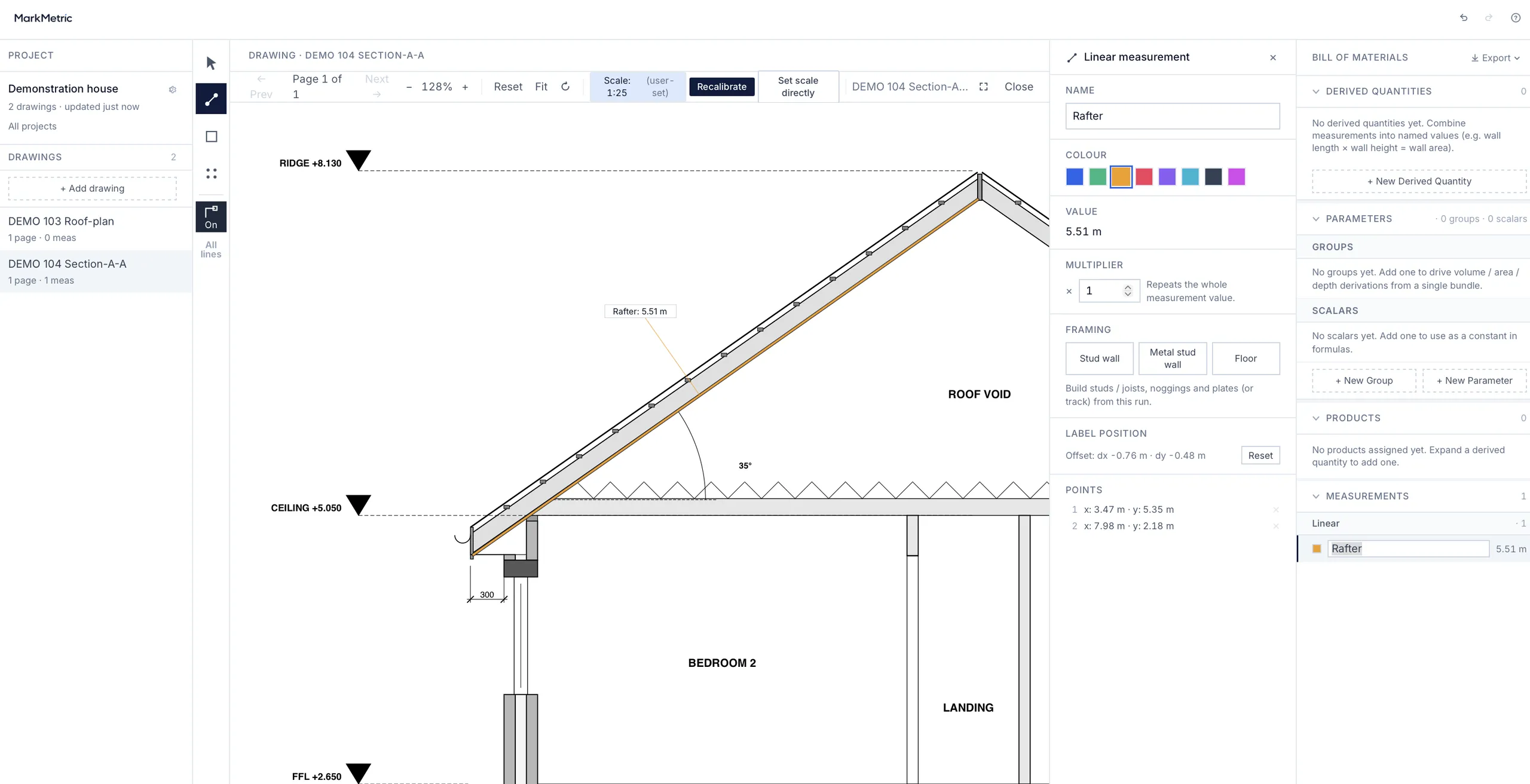
Draw a Linear down the rafter on the section — eave to ridge — and MarkMetric reads the angle from the line. No trig typed, no rule of thumb, no number carried over from another job. The pitch is grounded in the section, the way the rest of the take-off is grounded in the drawing.
However you know the pitch, MarkMetric takes it.
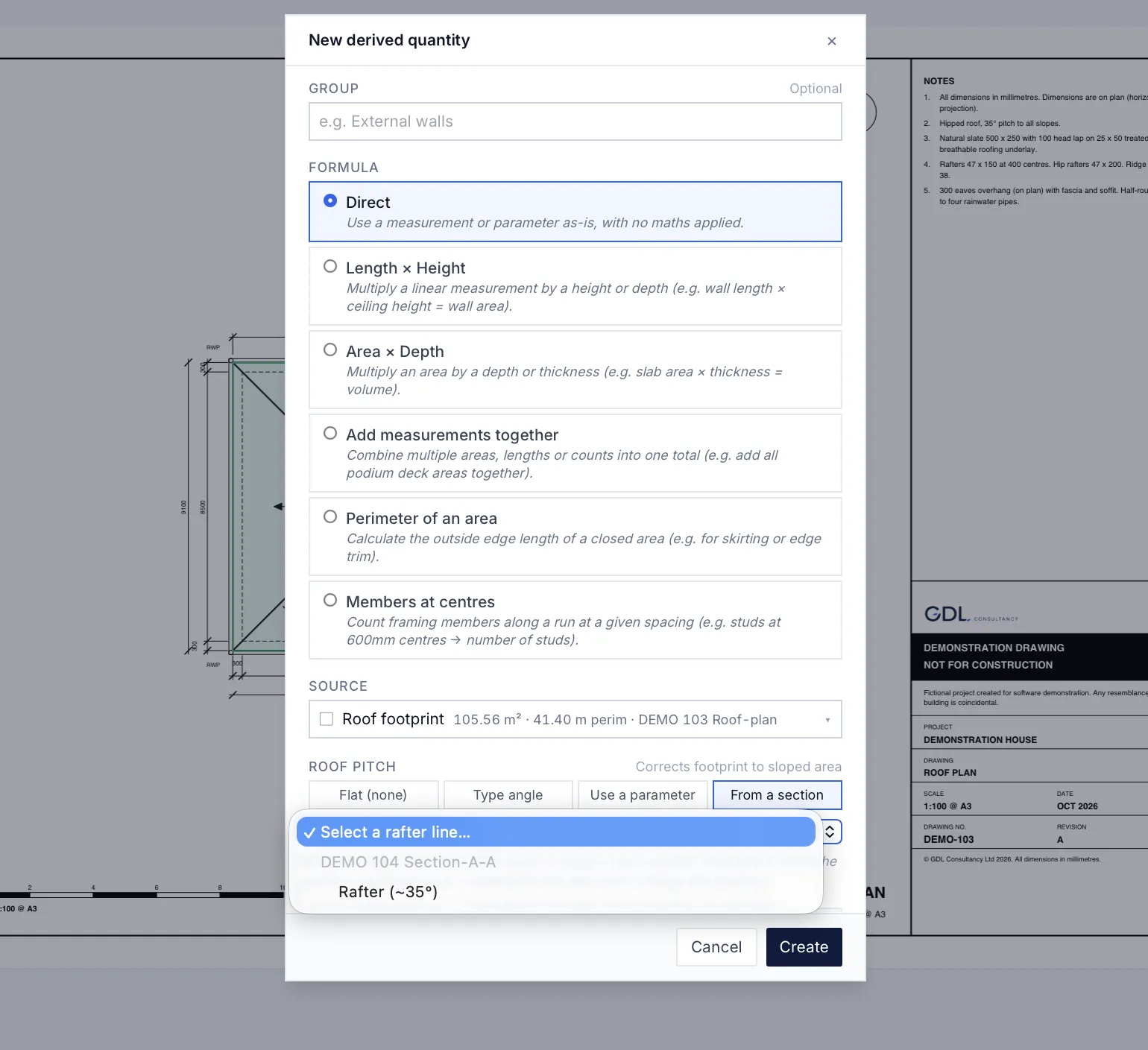
Build a roof area as a derived quantity from the footprint, and set its pitch four ways: Flat (no correction), type the angle, use a project parameter (set once, reused across the roof), or from a section (pick the rafter you just measured). MarkMetric returns the slope factor and the corrected area on the spot.
Then, precisely: the pitch is captured once, at the moment you pick it. Editing the rafter line afterwards will not silently reprice the job — a deliberate choice, so a stray drag on a drawing never moves a quantity you have already issued.
Correct once. Everything downstream is right.
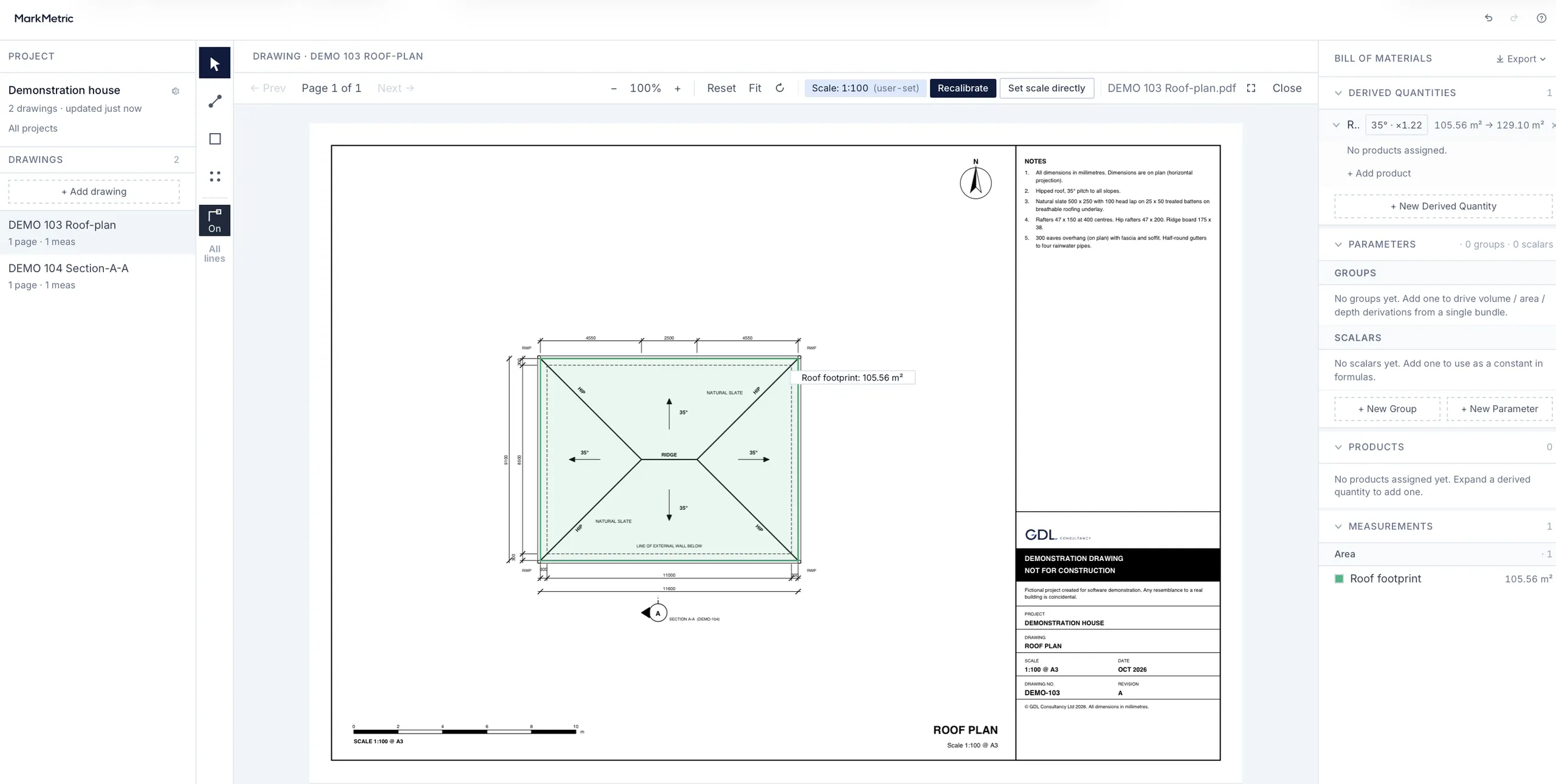
The corrected area is the quantity — not an annotation on it. Here a 105.56 m² footprint at 35° becomes 129.10 m² true: a slope factor of ×1.22, and about 22% more material than the flat plan says. Every product attached to that quantity — slate, felt, battens — is ordered against the corrected figure, with your wastage on top. Nothing to remember, nothing to re-key.
Then the limitation, plainly: the correction applies to roof areas, not to sloping lines in plan. Hips, valleys and rafters drawn on a plan are foreshortened; MarkMetric does not rake them. Measure those true off a section, or enter them by hand. We would rather tell you where the line is than have you find it on site.
Where it stops, and where it won’t warn you.
The correction takes real arithmetic off your hands — but it is arithmetic, not judgement, and there are a few places it will not warn you. Know these and none of them will bite.
Forget to set a pitch and the roof prices as flat. The factor is 1, applied silently, with no warning — a pitched roof left un-pitched under-orders every material on it, and nothing on the screen nags you to go back and set it.
One pitch corrects one area. A mansard, a dormer, or hips running at different slopes each need their own roof area with its own pitch — this is a planar correction applied to a quantity, not a model of the roof’s geometry.
The plausibility check is advisory, not a gate. Type an implausible pitch and it still prices; the figure is flagged amber, never rejected. The flag is there to catch a slip, not to stop you making one.
A section cut obliquely reads shallower than the true pitch, and passes unflagged — unless the rafter you pick is very short, or the angle lands below 15°. Pick the pitch off a true section, square to the slope.
Priced on your rates, for this job.
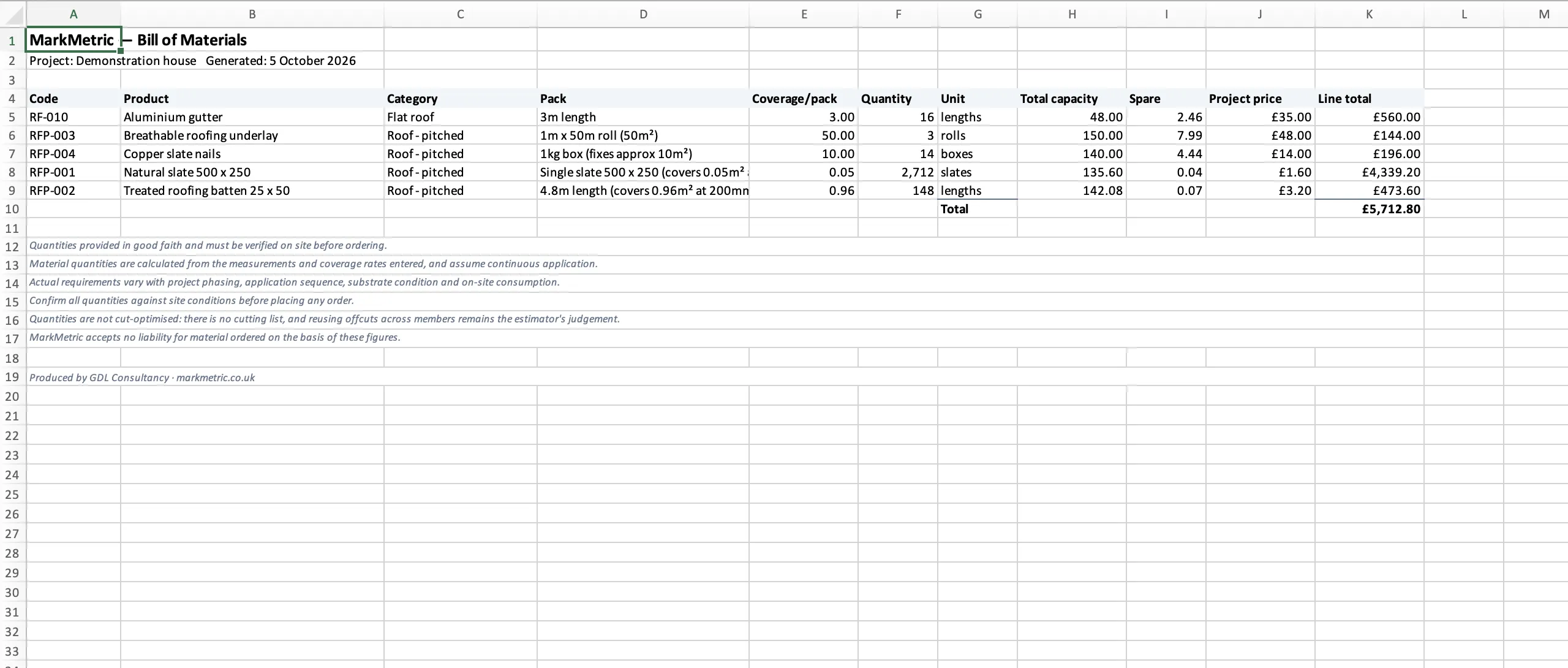
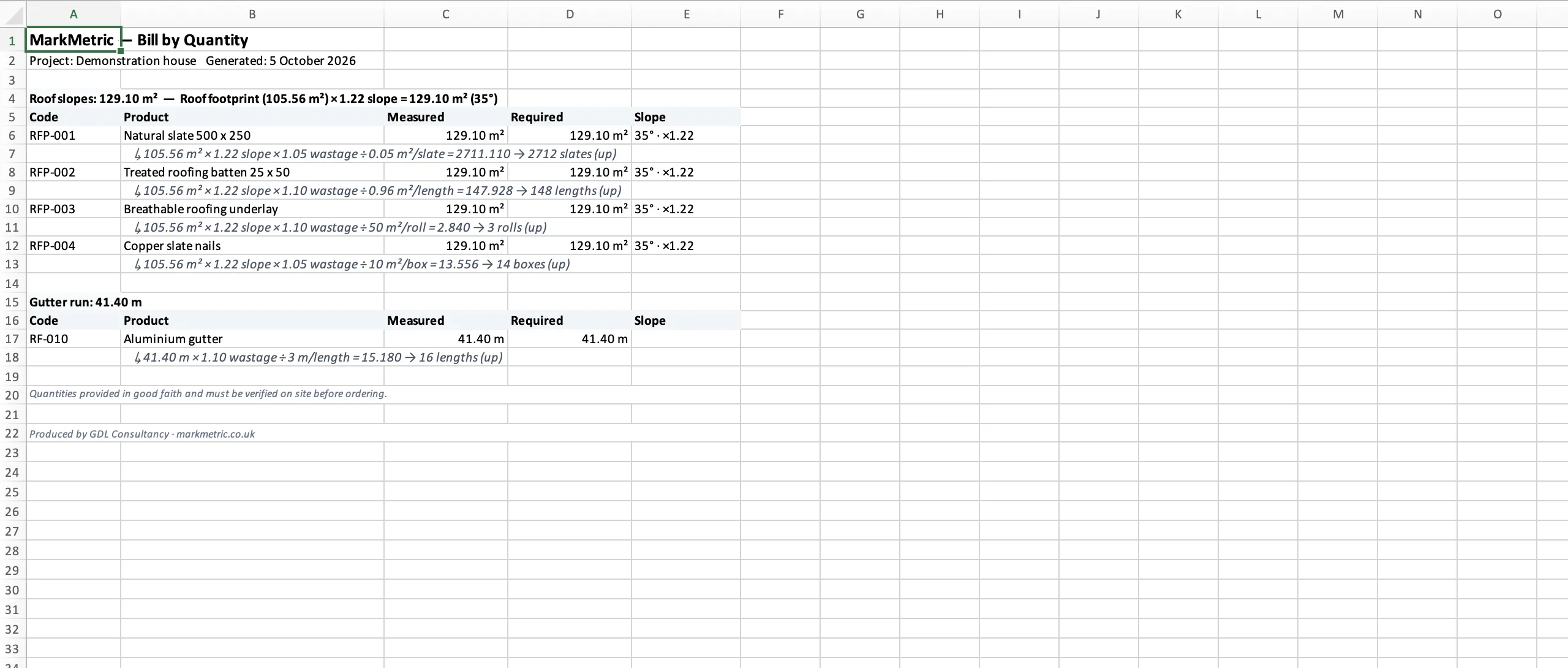
Your slate, your felt, your battens, at the prices you actually buy at — a merchant’s list on one job, a supplier’s quote on the next, applied per project and kept on your machine. MarkMetric turns the corrected area into a priced Bill of Materials: 2,712 slates, 148 batten lengths, 3 rolls of underlay and 14 boxes of nails, each rounded up to how the material is actually sold.
Every figure carries its slope.
Export to Excel and the Bill by Quantity sets out each line in full: the measured footprint, the slope factor, the wastage, the coverage, and the rounding — the 105.56 m² footprint becomes 129.10 m² true at 35°, and that 129.10 m², taken with 5% wastage against 0.05 m² per slate, comes to 2,711.11 and rounds up to 2,712 slates. A conditional Slope column carries the pitch and factor beside every quantity it touched. Hand it to a checker and they can follow it, line by line, without asking you what the 1.22 was.
Flat roofs too.
Set the pitch to Flat and the footprint is the area — no correction, same chain. A job with a pitched main roof and a flat rear extension is one project, one catalogue, one bill.
How it works
- Trace the roof area on the plan.
- Give it a pitch — typed, a parameter, or picked off a rafter on the section.
- Attach your products, and the priced take-off comes out against the true sloped area.
Take off your next roof on the area you are actually buying.
Measure the pitch off the drawing, price it on your rates, and hand over a figure that shows its working.
Lifetime licence
£495 one-time
- Every feature — no tiers, nothing held back
- One-time payment — no subscription, no renewal
- Runs in your browser, on Mac or PC
- Your projects and pricing stay on your machine
Common questions
- Does MarkMetric correct roof areas for pitch?
- Yes. Build a roof area from the footprint and set its pitch, and MarkMetric returns the true sloped area — footprint divided by the cosine of the pitch — as the live quantity. A 27° pitch returns a slope factor of about 1.12, so roughly 12% more material than the flat plan suggests.
- How do I set the pitch?
- Four ways: flat (no correction), type the angle, use a project parameter set once and reused, or pick a rafter you have measured on the section. The pitch is captured at the moment you pick it, so editing the rafter afterwards will not silently reprice the job.
- Can I get the pitch from a section drawing?
- Yes. Draw a Linear down the rafter on the section, eave to ridge, then pick that line as the pitch source. No trigonometry typed. It is a pick, not automatic detection — you choose the line, MarkMetric reads the angle.
- Does it correct sloping lines like hips, valleys and rafters?
- No, and we would rather say so. The slope correction applies to roof areas. Lines drawn on a plan — hips, valleys, rafter runs — are foreshortened, and MarkMetric does not rake them. Measure those true off a section, or enter them by hand.